
How to Use NinjaTrader Demo Account for Futures Trading Practice
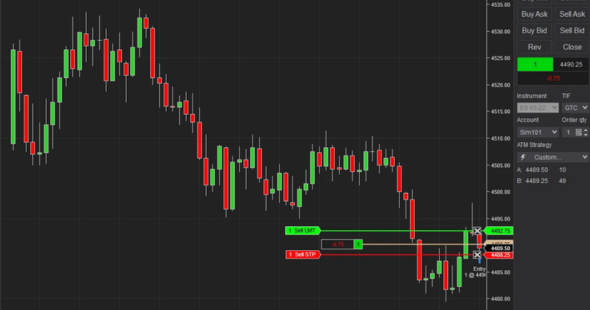
A Ninjatrader trial account lets consumers learn about futures trading more safely before they start using real money. This article tells you how to set up practice trading, how simulation works, what beginners commonly get wrong, and how to utilise the platform to learn in a more structured way.
Why Beginners Prefer a Risk-Free Futures Trading Simulator
When trading futures, you have to pay attention to a lot of things, like price changes, margin, leverage, and contract size. A futures trading simulator allows consumers to slow down that process and learn how to place orders, read charts, and manage their positions without having to worry about money.
NinjaTrader states that its simulation environment lets people test trading ideas before putting money at risk, with a free trial option and unlimited simulated trading available with funded accounts. Simulated trading remains hypothetical and does not reflect real results.
A practical benefit is repetition. People can place trades, review mistakes, reset expectations, and build familiarity with markets such as Micro E-minis before moving toward live trading.
Step-by-Step Guide to Set Up NinjaTrader Demo Account
To begin, sign up for an account with NinjaTrader. Then, pick the platform access that works best for your device. NinjaTrader works on desktops, the web, and mobile devices. Its website lists free trading simulation as one of its futures trading tools.
Download and Install the Platform
To practise on your PC, download NinjaTrader PC and log in with your account information. Most of the time, Windows users have the easiest time setting things up with the desktop version. Mac users might prefer online access or other compatible device options.
After you've loaded it, make sure that the charts load correctly, the market data is shown, and all of the account tabs are there. There are a lot of people on forums who report they feel lost when demo access goes away. If you grasp the difference between platform access and real-time data access, you can stop this from happening.
Activate Simulation Mode
You can access the simulation in NinjaTrader Desktop using the Sim101 account in the order entry windows. NinjaTrader also has a Global Simulation Mode that only lets you enter orders on simulation accounts. This helps stop you from making real trades by mistake.
That switch for safety is important. Many newbies practise the right way for days, but when they look at order panels, they forget which account they have chosen. While learning how the platform works, Global Simulation Mode adds a useful guardrail.
Navigate the Control Center
The Control Center is the key core of the platform. From there, people may manage relationships, look at charts, see accounts, and order tools. At first, it could seem easy, but knowing this area ahead of time will help you avoid a lot of mistakes when setting up.
NinjaTrader also allows multiple simulation accounts through the Accounts tab. That can help separate practice styles, such as one account for scalping practice and another for slower chart-based setups.
How to Practice Trades Using NinjaTrader Simulator
A Ninja Trader simulator works best when practice feels organised instead of just random. Instead of browsing around, you should choose one market, one session, and one setup idea. After that, do it enough times to see how people's choices change over time.
Placing Trades In Sim Mode
Begin with simple order types. Practice market orders, limit orders, stop orders, and bracket style exits before you experiment with more advanced tools. The goal is not excitement but more muscle memory.
Keep track of every simulated trade with these three things:
- Why the trade was made
- Where the risk was
- What happened after the exit
That simple record of the mentioned things changes a simulation into feedback. Without notes, practice turns into fun.
Using Charts and Indicators
NinjaTrader offers charting, market analysis tools, and customization through third-party add-ons and its development framework. That flexibility is useful, but beginners can easily overload charts before understanding basic price movement.
Begin with clear charts. Only add one or two tools when they help you solve a real question. An indicator should assist you in understanding things like trend, volatility, volume, or where trades are happening. Everything else is just noise.
Common Issues People Face With Demo Accounts And Fixes
One common issue is expired real-time demo data. NinjaTrader support explains that an expired demo can mean delayed data rather than real-time demo data, while opening a NinjaTrader account can provide access to unlimited paper trading simulation with real-time data for the account duration.
Another problem is that some simulation accounts are missing. In a lot of circumstances, individuals need to reconnect to a data provider, look at the Accounts page, or make sure the right workspace is open. You might also need to reconnect before the new simulation account shows up.
Some people on forums also ask about lifetime or extended demo access. The better way to think about the Ninjatrader free simulation mode is to separate platform simulation from live streaming market data. Simulation may continue, but real-time data access can depend on trial status, funding, or account settings.
Tips to Get Real Value From Simulation Trading
When done right, practice should be a little boring. Choose a set routine and stick to it long enough to see how you're doing. Switching between instruments, time frames, and indications makes it tougher to grasp the data.
Not only strategy, but also behaviour should be tested via simulation. Pay attention to when you get impatient, when stops move for no reason, or when you close a successful trade too soon. Those behaviours are often more important than getting a new chart tool.
NinjaTrader emphasises best practices such as knowing the details of contracts, margin needs, how the market works, being conscious of risk, sizing positions, placing stops, and setting profit targets. Before you start trading for real, you should practise those same tendencies in a simulation.
Frequently Asked Questions
Can a NinjaTrader Demo Account Be Used for Free?
NinjaTrader provides free trial access for simulated trading and also offers free simulated trading within its platform plans. Some real-time data access may depend on trial status, funding, or account conditions.
What Happens When a Demo Trial Expires?
Practice access may still be possible, but real-time demo data can shift to delayed data. That is why many people see charts behave differently after a trial period ends.
Is Simulated Trading the Same As Live Trading?
No. Simulation is a wonderful way to practise on a platform, process orders, and test methods. However, live trading adds slippage, emotions, liquidity issues, and real money problems.
Can Multiple Simulation Accounts Be Created?
Yes. NinjaTrader support documentation explains that people can create multiple simulation accounts through the Control Center Accounts tab. This is useful for testing separate methods without mixing results.
Should Beginners Practice Before Trading Live Futures?
Yes. There is a lot of risk involved in futures, and NinjaTrader's own disclosures say that not everyone should trade futures. Simulation is a good way for learners to learn about contracts, stops, and how platforms work.
When you use structure, a NinjaTrader demo account can be more than just a practice login. Don't think of simulation as a game; think of it as a training journal. Tools are available on platforms like NinjaTrader, but how much success you have relies on how often you utilise them.
Before moving toward a paid plan or live trading, it may also be worth checking for available NinjaTrader Promo Codes to reduce initial costs.
Follow Essencesly for more practical insights on trading platforms, tools, and smarter ways to approach the markets.